> For the complete documentation index, see [llms.txt](https://guide.nin.earth/llms.txt). Markdown versions of documentation pages are available by appending `.md` to page URLs; this page is available as [Markdown](https://guide.nin.earth/guidebook/markdown/how-do-i-purchase-tiles.md).

# How do I purchase Tiles?

<mark style="color:$warning;">NIN.Earth</mark> currently supports 3 active payment methods for buying tiles. Users can choose the option that best suits their environment.

<figure><img src="https://2902267430-files.gitbook.io/~/files/v0/b/gitbook-x-prod.appspot.com/o/spaces%2F5LAEHDS7jvCC6hgJFI2D%2Fuploads%2FMDf5vA09xjkj9DpAco11%2Fpurchase%20tiles_main.jpg?alt=media&amp;token=9f333332-4662-460d-8d43-4d5365d4eb23" alt="" width="563"><figcaption></figcaption></figure>

<a href="/guidebook/markdown.md" class="button primary" data-icon="circle-up">Back to top</a>

{% hint style="success" %}

### MENU (3 Ways to Purchase)

* [#crypto-solana](#crypto-solana "mention")
* [#gift-code](#gift-code "mention")
* [#paypal](#paypal "mention")
  {% endhint %}

### **Crypto (Solana)**

You can buy Tiles using SOL through your connected Solana wallet (e.g., Phantom).

{% tabs %}
{% tab title="PC" %}
{% stepper %}
{% step %}

#### <mark style="color:$primary;">Search</mark> / <mark style="color:$primary;">Select</mark> Tiles & <mark style="color:$primary;">Connect</mark> Wallet

1. [How do I find the Tile I want?](/guidebook/markdown/how-do-i-find-the-tile-i-want.md)
2. [How do I Select Tiles?](/guidebook/markdown/how-do-i-select-tiles.md)
3. [How do I connect my wallet?](/guidebook/markdown/how-do-i-connect-my-wallet.md)
   {% endstep %}

{% step %}

#### <mark style="color:$primary;">Check</mark> the Price

<figure><img src="https://2902267430-files.gitbook.io/~/files/v0/b/gitbook-x-prod.appspot.com/o/spaces%2F5LAEHDS7jvCC6hgJFI2D%2Fuploads%2Fr6FJWW5Awtzz9C02XmZk%2Fimage.png?alt=media&amp;token=40c51b5e-0b39-4eb9-ac95-f4d8c36f1756" alt="" width="563"><figcaption></figcaption></figure>

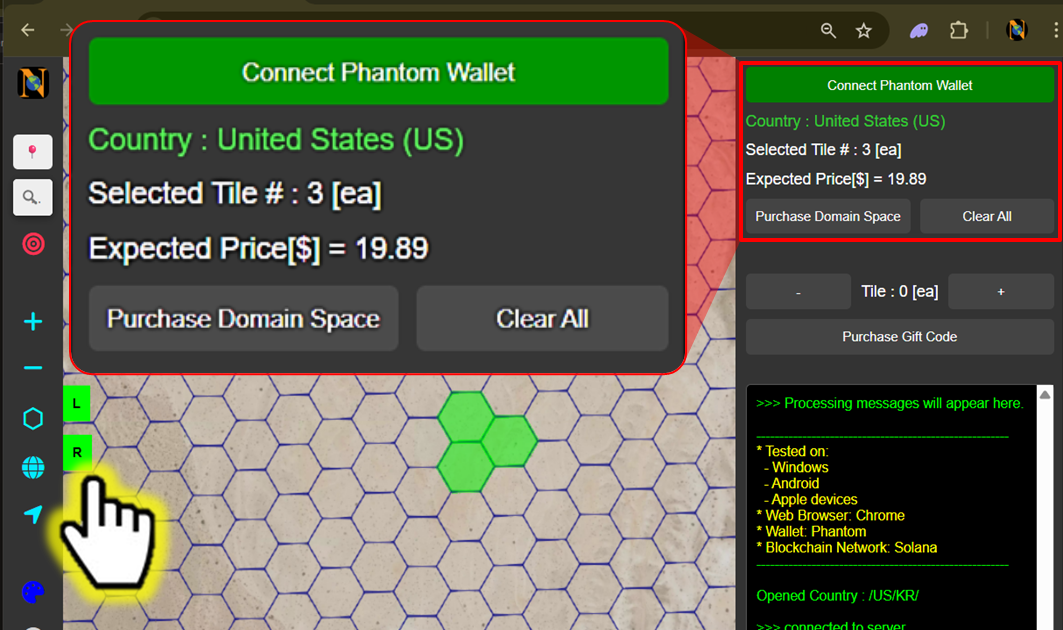
When you open <mark style="color:$success;">R panel</mark>, the total price will be displayed based on the number of selected Tiles.

* Tile price: $5 /tile ($5.5 including VAT 10%)
* NFT minting cost (including transaction fees) is approximately 0.03 SOL
  {% endstep %}

{% step %}

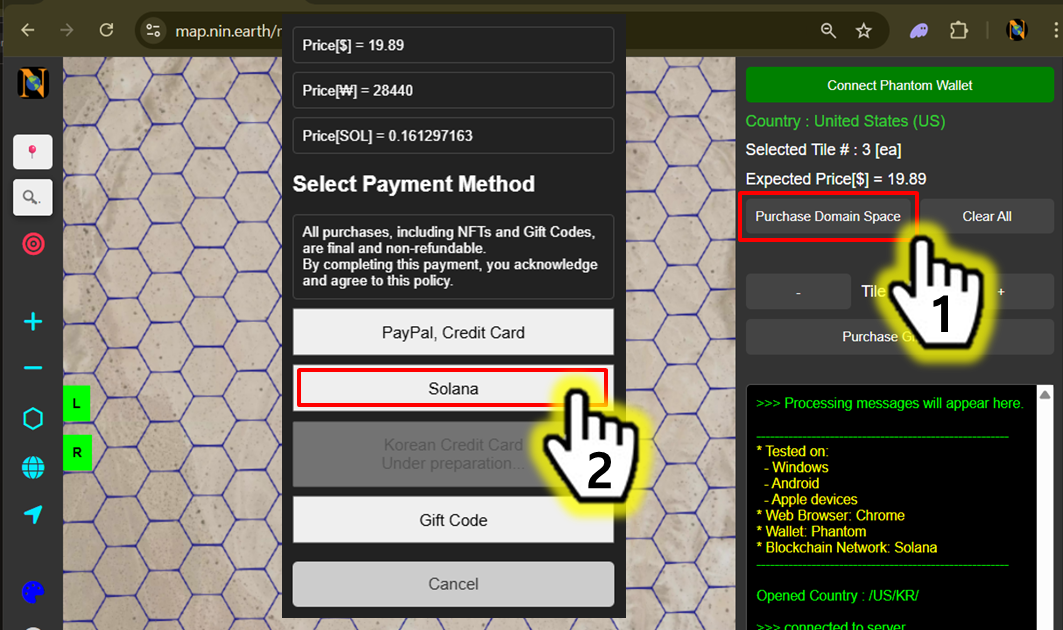
#### <mark style="color:$primary;">Pay</mark> with \[Solana]

<figure><img src="https://2902267430-files.gitbook.io/~/files/v0/b/gitbook-x-prod.appspot.com/o/spaces%2F5LAEHDS7jvCC6hgJFI2D%2Fuploads%2FpKWBKbOUdLho3jsypu3g%2Fimage.png?alt=media&amp;token=c1533bfe-79a0-49b7-87a2-ce4655ea25b3" alt="" width="563"><figcaption></figcaption></figure>

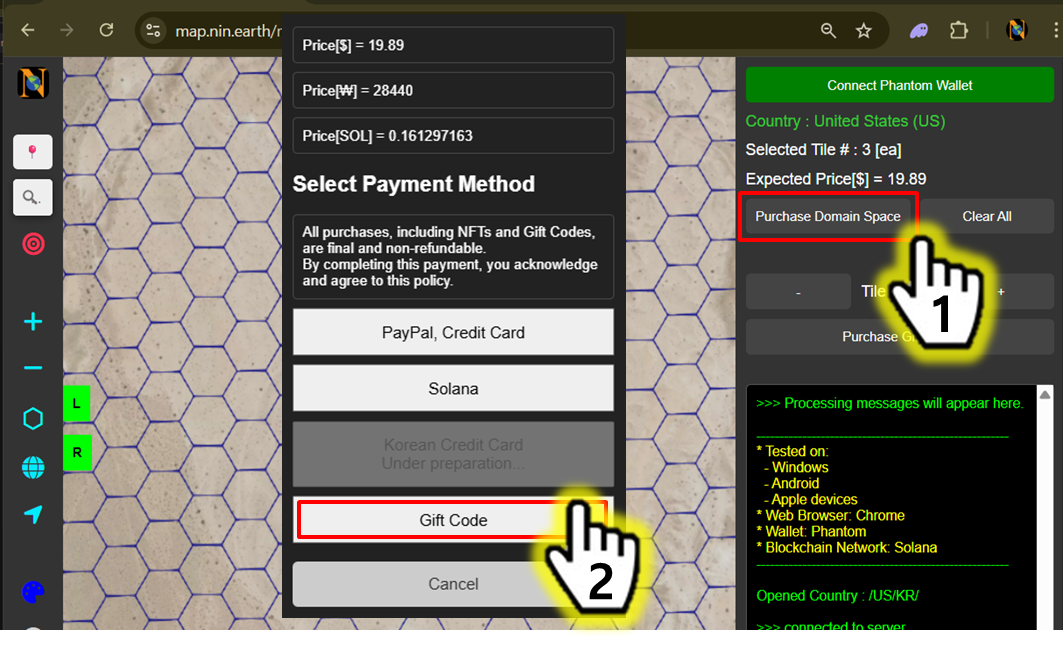
1. Click \[Purchase Domain Space]
2. Click \[Solana]

<figure><img src="https://2902267430-files.gitbook.io/~/files/v0/b/gitbook-x-prod.appspot.com/o/spaces%2F5LAEHDS7jvCC6hgJFI2D%2Fuploads%2Fuq9qlbXX8RdkIk0o872H%2Fimage.png?alt=media&amp;token=5bc7f9a3-9d5b-4dcc-afe3-53c2fc3796ef" alt="" width="563"><figcaption></figcaption></figure>

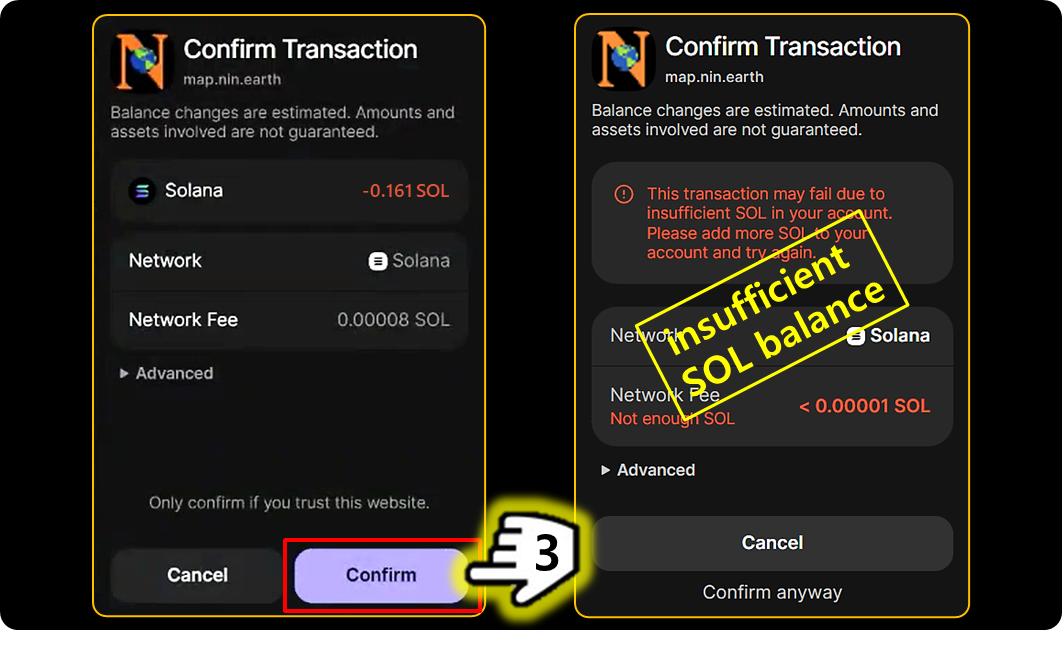
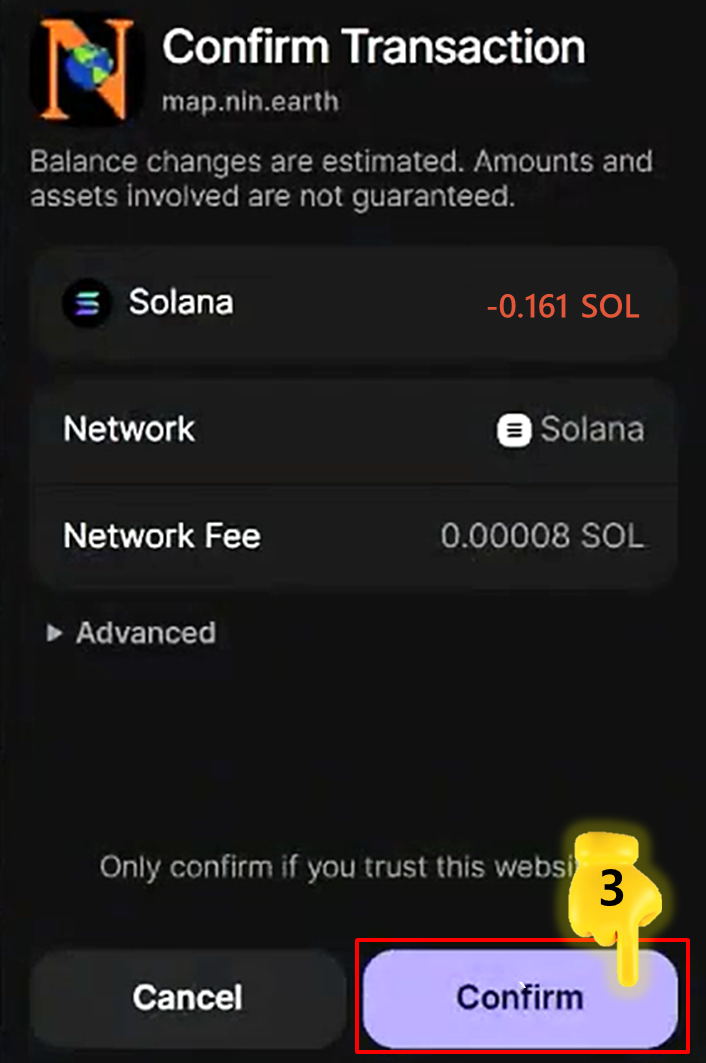
3. Click \[Confirm] → Done.

{% hint style="warning" %}

### If your SOL balance is insufficient;

1. Add **SOL** to your wallet.
2. Proceed with another payment method.
   {% endhint %}
   {% endstep %}

{% step %}

#### <mark style="color:$primary;">Confirm</mark> your Purchase

<figure><img src="https://2902267430-files.gitbook.io/~/files/v0/b/gitbook-x-prod.appspot.com/o/spaces%2F5LAEHDS7jvCC6hgJFI2D%2Fuploads%2Fdmwe5fYqh0fdo1uaO8yv%2Fimage.png?alt=media&amp;token=895a2923-b5fb-4335-bf34-89cb134498e6" alt="" width="563"><figcaption></figcaption></figure>

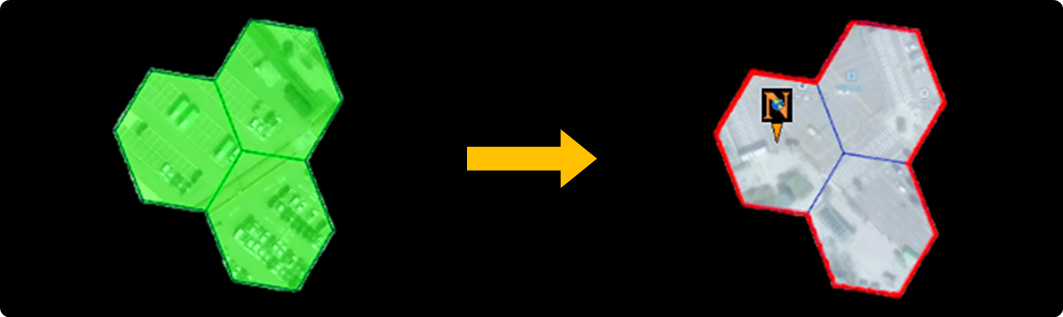
1. Tile & Grid color updates and Marker creation

<figure><img src="https://2902267430-files.gitbook.io/~/files/v0/b/gitbook-x-prod.appspot.com/o/spaces%2F5LAEHDS7jvCC6hgJFI2D%2Fuploads%2FROY4Alx51RfKjYUp4LPt%2Fimage.png?alt=media&amp;token=759bc49c-a8a8-4934-9a3f-b201cdd9c122" alt="" width="563"><figcaption></figcaption></figure>

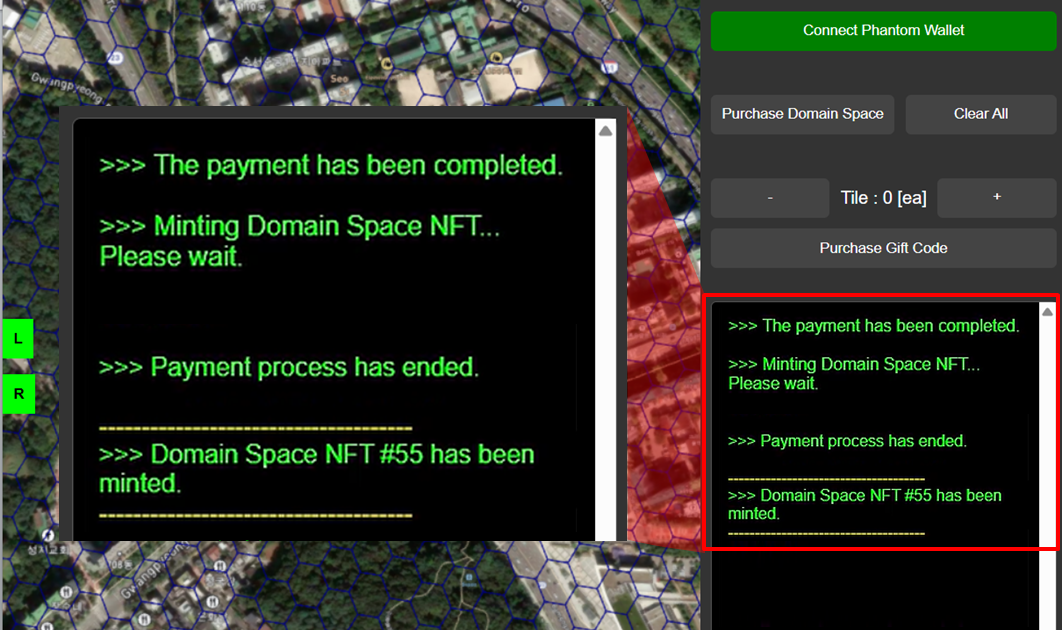
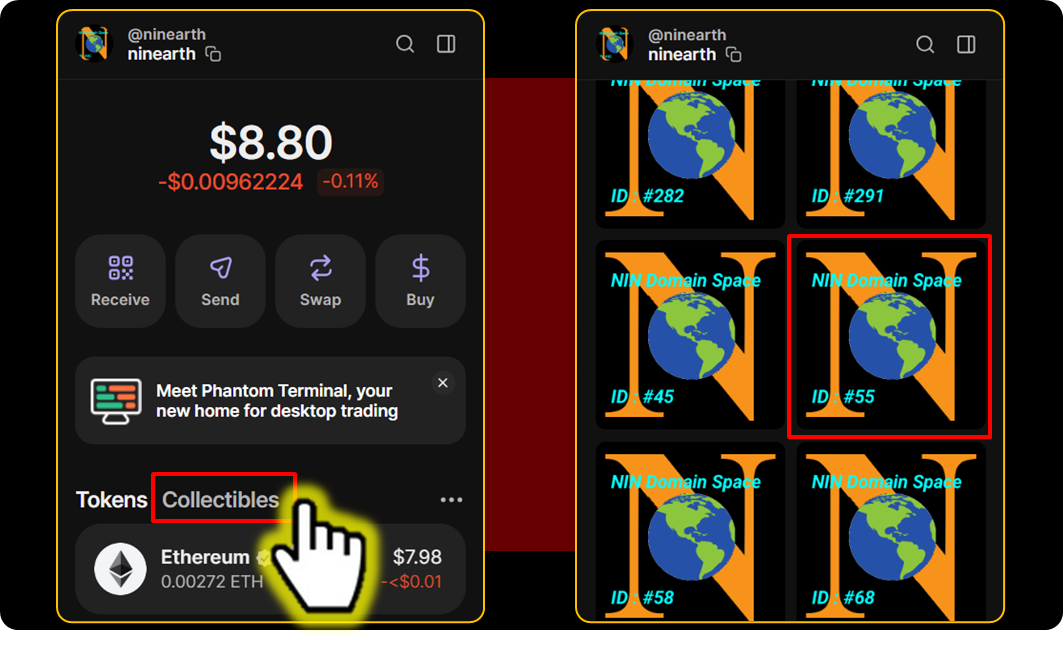
2. Transaction details available in the Info screen

<figure><img src="https://2902267430-files.gitbook.io/~/files/v0/b/gitbook-x-prod.appspot.com/o/spaces%2F5LAEHDS7jvCC6hgJFI2D%2Fuploads%2FuJ34xm59yey5oKGOzeA9%2Fimage.png?alt=media&amp;token=601756ef-3ba8-4529-890b-abac402b0a51" alt="" width="563"><figcaption></figcaption></figure>

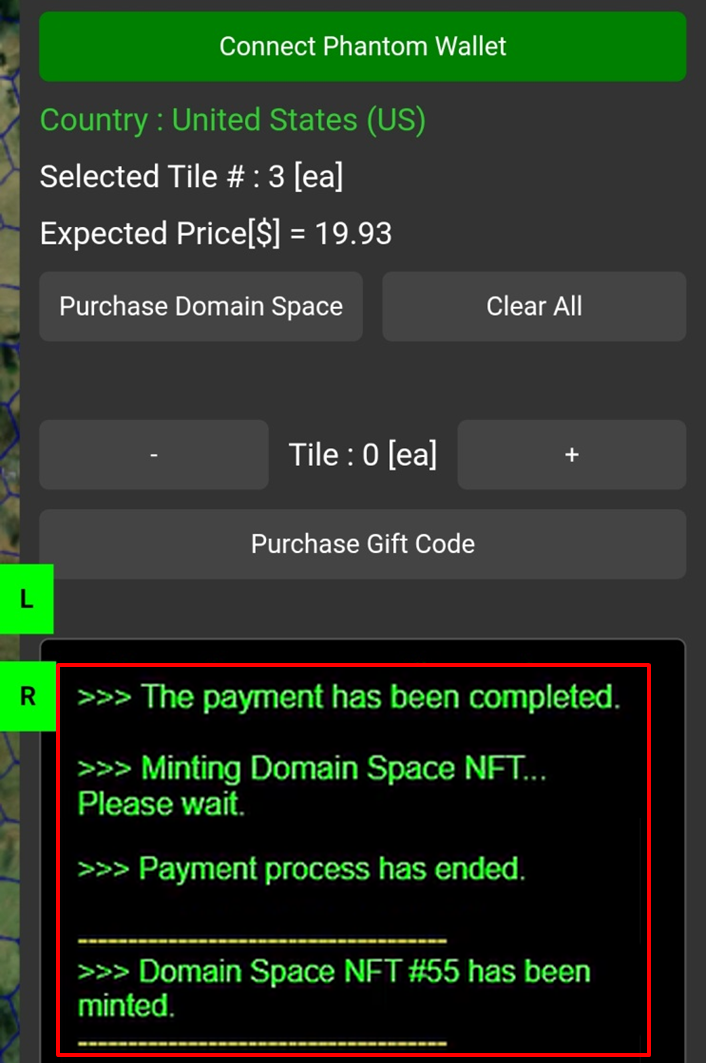
3. NFT creation (viewable in your personal Wallet)
   {% endstep %}
   {% endstepper %}
   {% endtab %}

{% tab title="Mobile" %}
{% stepper %}
{% step %}

#### <mark style="color:$primary;">Search</mark> / <mark style="color:$primary;">Select</mark> Tiles & <mark style="color:$primary;">Connect</mark> Wallet

1. [How do I find the Tile I want?](/guidebook/markdown/how-do-i-find-the-tile-i-want.md)
2. [How do I Select Tiles?](/guidebook/markdown/how-do-i-select-tiles.md)
3. [How do I connect my wallet?](/guidebook/markdown/how-do-i-connect-my-wallet.md)
   {% endstep %}

{% step %}

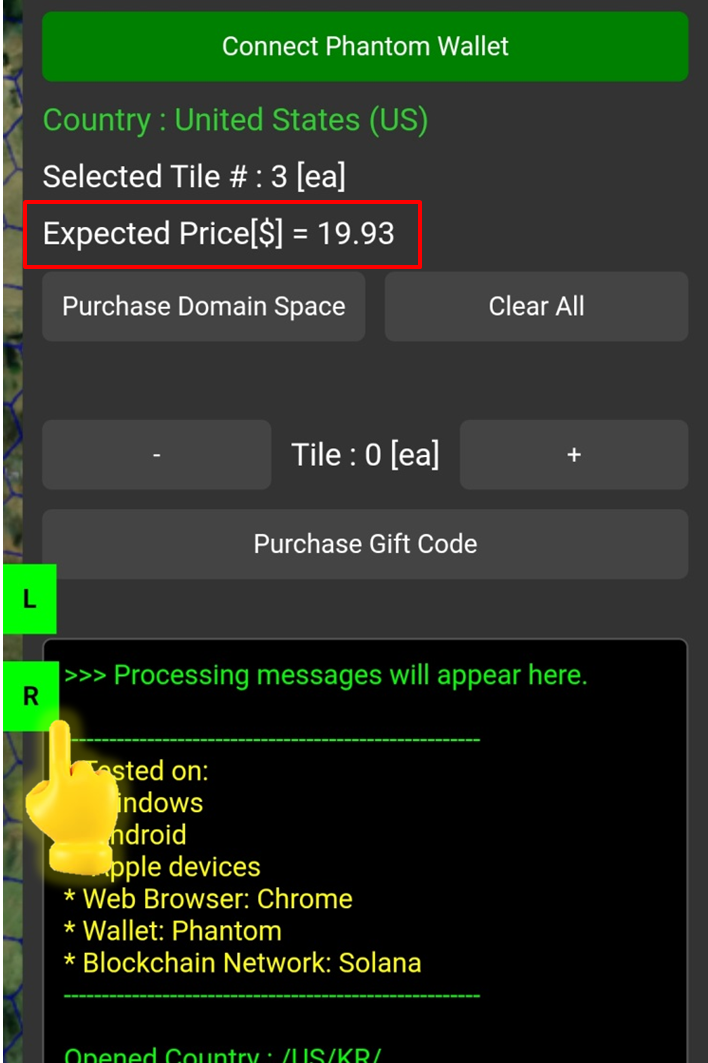
#### <mark style="color:$primary;">Check</mark> the Price

<figure><img src="https://2902267430-files.gitbook.io/~/files/v0/b/gitbook-x-prod.appspot.com/o/spaces%2F5LAEHDS7jvCC6hgJFI2D%2Fuploads%2F1QW2km7SFNzVJ5S89PcI%2Fimage.png?alt=media&amp;token=dac2725b-79cb-4839-a03d-f25792bf8209" alt="" width="354"><figcaption></figcaption></figure>

When you tap <mark style="color:$success;">R panel</mark>, the total price will be displayed based on the number of selected Tiles.

* Tile price: $5 /tile ($5.5 including VAT 10%)
* NFT minting cost (including transaction fees) is approximately 0.03 SOL
  {% endstep %}

{% step %}

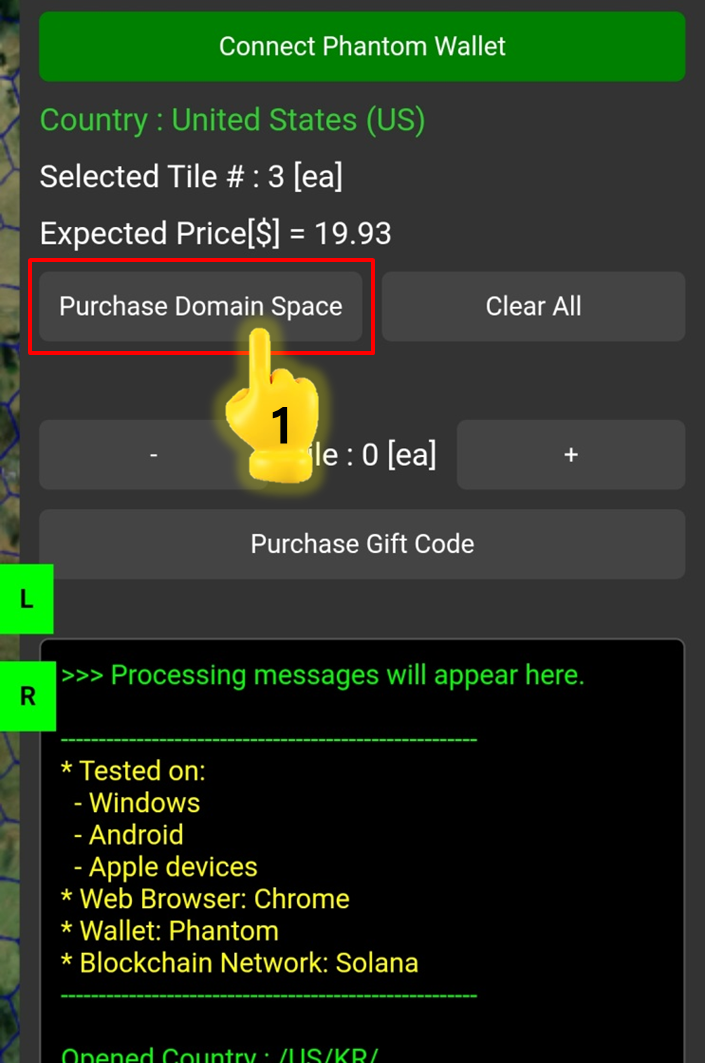
#### <mark style="color:$primary;">Pay</mark> with \[Solana]

<figure><img src="https://2902267430-files.gitbook.io/~/files/v0/b/gitbook-x-prod.appspot.com/o/spaces%2F5LAEHDS7jvCC6hgJFI2D%2Fuploads%2FqBmQnWLjQ7mY8NU5nirX%2Fimage.png?alt=media&amp;token=ddd55bfd-5299-4aa0-8291-1f4769274e46" alt="" width="353"><figcaption></figcaption></figure>

1. Tap \[Purchase Domain Space]

<figure><img src="https://2902267430-files.gitbook.io/~/files/v0/b/gitbook-x-prod.appspot.com/o/spaces%2F5LAEHDS7jvCC6hgJFI2D%2Fuploads%2FURQTmb5BE0bMDakZ4kEI%2Fimage.png?alt=media&amp;token=9622df30-e8b9-4f7d-bbc7-5e31885a1288" alt="" width="353"><figcaption></figcaption></figure>

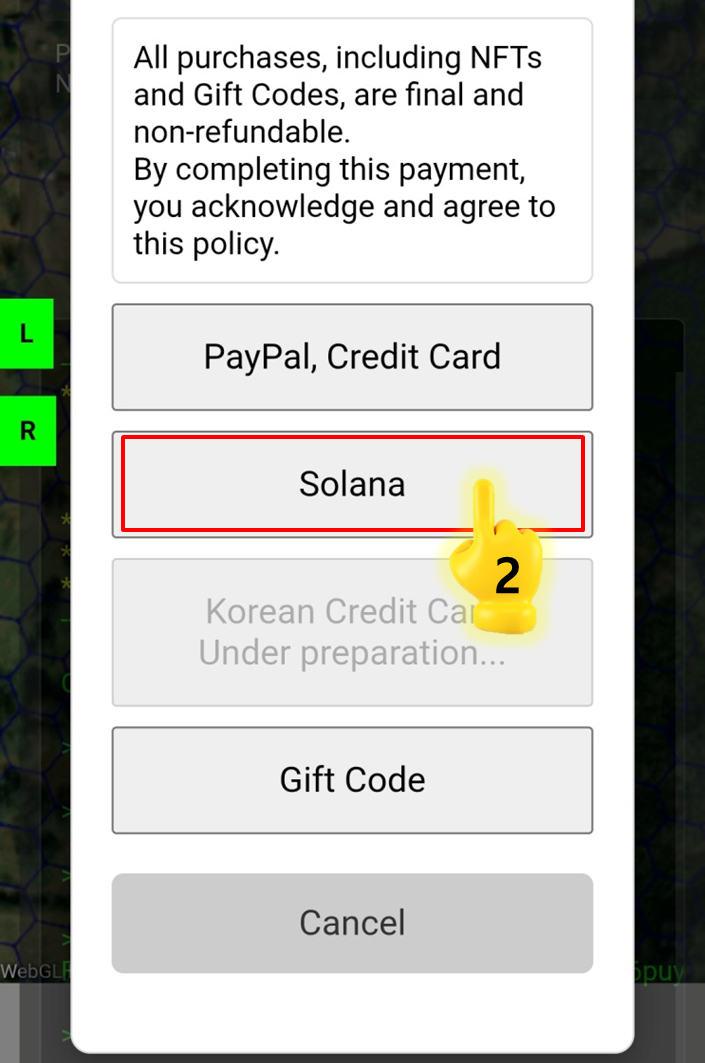
2. Tap \[Solana]

<figure><img src="https://2902267430-files.gitbook.io/~/files/v0/b/gitbook-x-prod.appspot.com/o/spaces%2F5LAEHDS7jvCC6hgJFI2D%2Fuploads%2FCsX1eWGZv3x5Tk8lULox%2Fimage.png?alt=media&amp;token=3f13fedf-f04a-4a19-abc3-d7e1dd0bb2d5" alt="" width="353"><figcaption></figcaption></figure>

3. Tap \[Confirm] → Done.

{% hint style="warning" %}

### If your SOL balance is insufficient:

1. Add **SOL** to your wallet.
2. Proceed with another payment method.
   {% endhint %}
   {% endstep %}

{% step %}

#### <mark style="color:$primary;">Confirm</mark> your Purchase

<figure><img src="https://2902267430-files.gitbook.io/~/files/v0/b/gitbook-x-prod.appspot.com/o/spaces%2F5LAEHDS7jvCC6hgJFI2D%2Fuploads%2Fdmwe5fYqh0fdo1uaO8yv%2Fimage.png?alt=media&amp;token=895a2923-b5fb-4335-bf34-89cb134498e6" alt="" width="563"><figcaption></figcaption></figure>

1. Tile & Grid color updates and Marker creation

<figure><img src="https://2902267430-files.gitbook.io/~/files/v0/b/gitbook-x-prod.appspot.com/o/spaces%2F5LAEHDS7jvCC6hgJFI2D%2Fuploads%2FRkzV1i3z9xFqMnu8M9eo%2Fimage.png?alt=media&amp;token=697c8ef4-ef05-48ad-ac28-6bdc38046df9" alt="" width="353"><figcaption></figcaption></figure>

2. Transaction details available in the Info screen

<figure><img src="https://2902267430-files.gitbook.io/~/files/v0/b/gitbook-x-prod.appspot.com/o/spaces%2F5LAEHDS7jvCC6hgJFI2D%2Fuploads%2FuJ34xm59yey5oKGOzeA9%2Fimage.png?alt=media&amp;token=601756ef-3ba8-4529-890b-abac402b0a51" alt="" width="563"><figcaption></figcaption></figure>

3. NFT creation (viewable in your personal Wallet)
   {% endstep %}
   {% endstepper %}
   {% endtab %}
   {% endtabs %}

### **Gift Code**

If you have a gift code, you can redeem it directly to acquire Tiles.

{% hint style="success" %}

### NOTE.

Gift codes are issued with a fixed number of Tiles.

So, If the number of selected Tiles does not match the number of Tiles specified in the Gift Code, a WARNING message will appear and the purchase will not proceed.
{% endhint %}

{% tabs %}
{% tab title="PC" %}
{% stepper %}
{% step %}

#### <mark style="color:$primary;">Search</mark> / <mark style="color:$primary;">Select</mark> Tiles & <mark style="color:$primary;">Connect</mark> Wallet

1. [How do I find the Tile I want?](/guidebook/markdown/how-do-i-find-the-tile-i-want.md)
2. [How do I Select Tiles?](/guidebook/markdown/how-do-i-select-tiles.md)
3. [How do I connect my wallet?](/guidebook/markdown/how-do-i-connect-my-wallet.md)
   {% endstep %}

{% step %}

#### <mark style="color:$primary;">Check</mark> the Price

<figure><img src="https://2902267430-files.gitbook.io/~/files/v0/b/gitbook-x-prod.appspot.com/o/spaces%2F5LAEHDS7jvCC6hgJFI2D%2Fuploads%2Fr6FJWW5Awtzz9C02XmZk%2Fimage.png?alt=media&amp;token=40c51b5e-0b39-4eb9-ac95-f4d8c36f1756" alt="" width="563"><figcaption></figcaption></figure>

When you open <mark style="color:$success;">R panel</mark>, the total price will be displayed based on the number of selected Tiles.

* Tile price: $5 /tile ($5.5 including VAT 10%)
* NFT minting cost (including transaction fees) is approximately 0.03 SOL
  {% endstep %}

{% step %}

#### <mark style="color:$primary;">Pay</mark> with \[Gift code]

<figure><img src="https://2902267430-files.gitbook.io/~/files/v0/b/gitbook-x-prod.appspot.com/o/spaces%2F5LAEHDS7jvCC6hgJFI2D%2Fuploads%2FL8ef7Z06c5EMQKUJewVa%2Fimage.png?alt=media&amp;token=f88e42d8-b30b-45af-95de-c3d9bc1ac801" alt="" width="563"><figcaption></figcaption></figure>

1. Click \[Purchase Domain Space]
2. Click \[Gift Code]

<figure><img src="https://2902267430-files.gitbook.io/~/files/v0/b/gitbook-x-prod.appspot.com/o/spaces%2F5LAEHDS7jvCC6hgJFI2D%2Fuploads%2FXrq2vTyVqrKphRmqHJWw%2Fimage.png?alt=media&amp;token=96018f98-8d1b-4fcb-8ced-d57e1958f01e" alt="" width="563"><figcaption></figcaption></figure>

{% hint style="success" %}

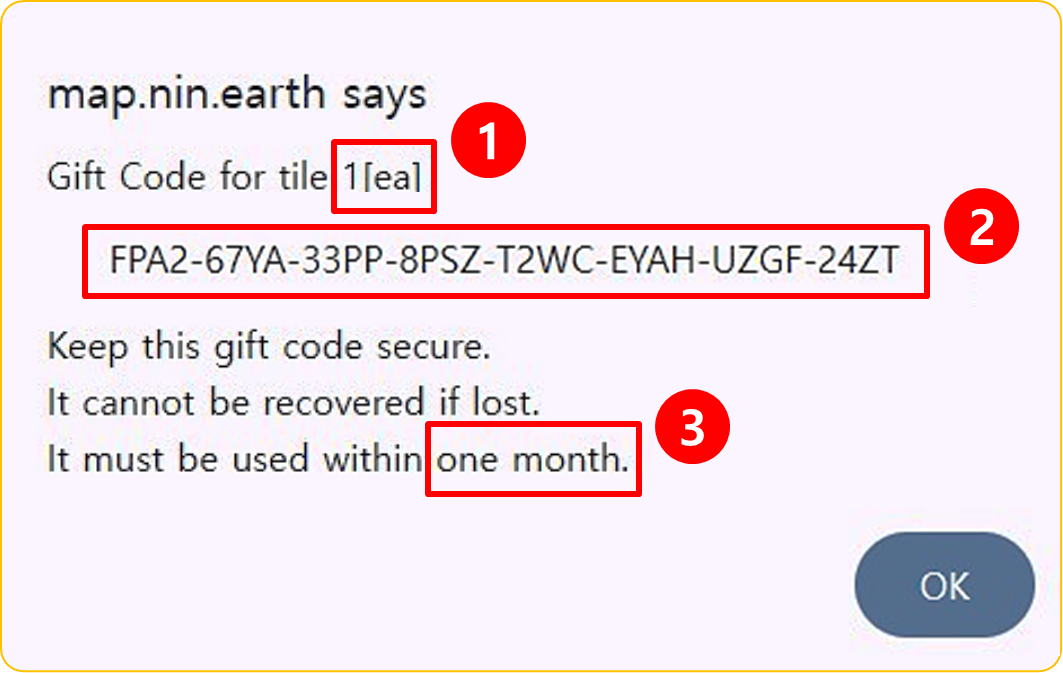
### NOTE. A Gift Code contains 3 important pieces of info.

1. The number of Tiles included in the Gift Code
2. The Gift Code serial number
3. The Gift Code is valid for 1 month.
   {% endhint %}

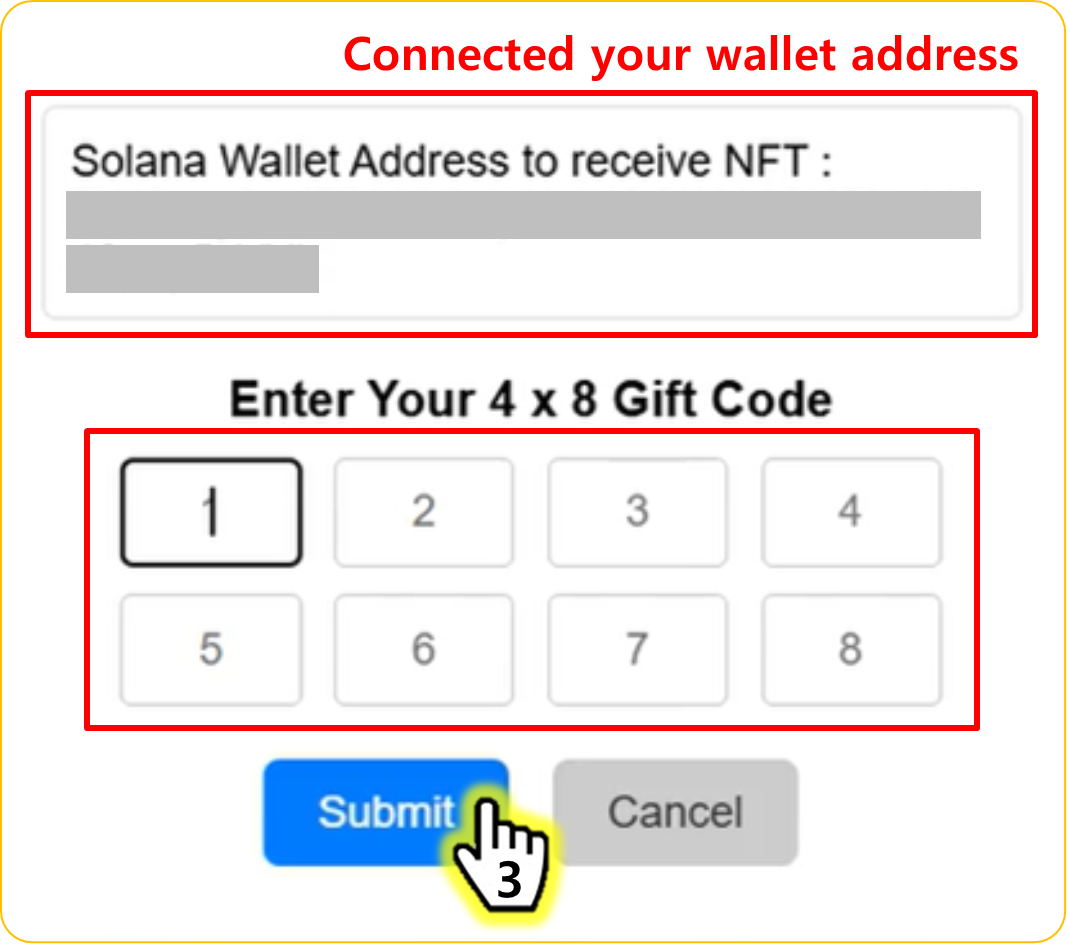
<figure><img src="https://2902267430-files.gitbook.io/~/files/v0/b/gitbook-x-prod.appspot.com/o/spaces%2F5LAEHDS7jvCC6hgJFI2D%2Fuploads%2FaoBINXZ1DkjQPRQHvUvx%2Fimage.png?alt=media&amp;token=3dc31a4a-e5e4-4542-bfd1-28ebedf3a19d" alt="" width="563"><figcaption></figcaption></figure>

3. Enter Gift Code number & Click \[Submit] → Done.

{% hint style="success" %}

### NOTE.

If the number of selected Tiles does not match the number of Tiles specified in the Gift Code, a WARNING message will appear and the purchase will not proceed.
{% endhint %}
{% endstep %}

{% step %}

#### <mark style="color:$primary;">Confirm</mark> your Purchase

<figure><img src="https://2902267430-files.gitbook.io/~/files/v0/b/gitbook-x-prod.appspot.com/o/spaces%2F5LAEHDS7jvCC6hgJFI2D%2Fuploads%2Fdmwe5fYqh0fdo1uaO8yv%2Fimage.png?alt=media&amp;token=895a2923-b5fb-4335-bf34-89cb134498e6" alt="" width="563"><figcaption></figcaption></figure>

1. Tile & Grid color updates and Marker creation

<figure><img src="https://2902267430-files.gitbook.io/~/files/v0/b/gitbook-x-prod.appspot.com/o/spaces%2F5LAEHDS7jvCC6hgJFI2D%2Fuploads%2FROY4Alx51RfKjYUp4LPt%2Fimage.png?alt=media&amp;token=759bc49c-a8a8-4934-9a3f-b201cdd9c122" alt="" width="563"><figcaption></figcaption></figure>

2. Transaction details available in the Info screen

<figure><img src="https://2902267430-files.gitbook.io/~/files/v0/b/gitbook-x-prod.appspot.com/o/spaces%2F5LAEHDS7jvCC6hgJFI2D%2Fuploads%2FuJ34xm59yey5oKGOzeA9%2Fimage.png?alt=media&amp;token=601756ef-3ba8-4529-890b-abac402b0a51" alt="" width="563"><figcaption></figcaption></figure>

3. NFT creation (viewable in your personal Wallet)
   {% endstep %}
   {% endstepper %}
   {% endtab %}

{% tab title="Mobile" %}
{% stepper %}
{% step %}

#### <mark style="color:$primary;">Search</mark> / <mark style="color:$primary;">Select</mark> Tiles & <mark style="color:$primary;">Connect</mark> Wallet

1. [How do I find the Tile I want?](/guidebook/markdown/how-do-i-find-the-tile-i-want.md)
2. [How do I Select Tiles?](/guidebook/markdown/how-do-i-select-tiles.md)
3. [How do I connect my wallet?](/guidebook/markdown/how-do-i-connect-my-wallet.md)
   {% endstep %}

{% step %}

#### <mark style="color:$primary;">Check</mark> the Price

<figure><img src="https://2902267430-files.gitbook.io/~/files/v0/b/gitbook-x-prod.appspot.com/o/spaces%2F5LAEHDS7jvCC6hgJFI2D%2Fuploads%2F1QW2km7SFNzVJ5S89PcI%2Fimage.png?alt=media&amp;token=dac2725b-79cb-4839-a03d-f25792bf8209" alt="" width="354"><figcaption></figcaption></figure>

When you tap <mark style="color:$success;">R panel</mark>, the total price will be displayed based on the number of selected Tiles.

* Tile price: $5 /tile ($5.5 including VAT 10%)
* NFT minting cost (including transaction fees) is approximately 0.03 SOL
  {% endstep %}

{% step %}

#### <mark style="color:$primary;">Pay</mark> with \[Gift code]

<figure><img src="https://2902267430-files.gitbook.io/~/files/v0/b/gitbook-x-prod.appspot.com/o/spaces%2F5LAEHDS7jvCC6hgJFI2D%2Fuploads%2FqBmQnWLjQ7mY8NU5nirX%2Fimage.png?alt=media&amp;token=ddd55bfd-5299-4aa0-8291-1f4769274e46" alt="" width="353"><figcaption></figcaption></figure>

1. Tap \[Purchase Domain Space]

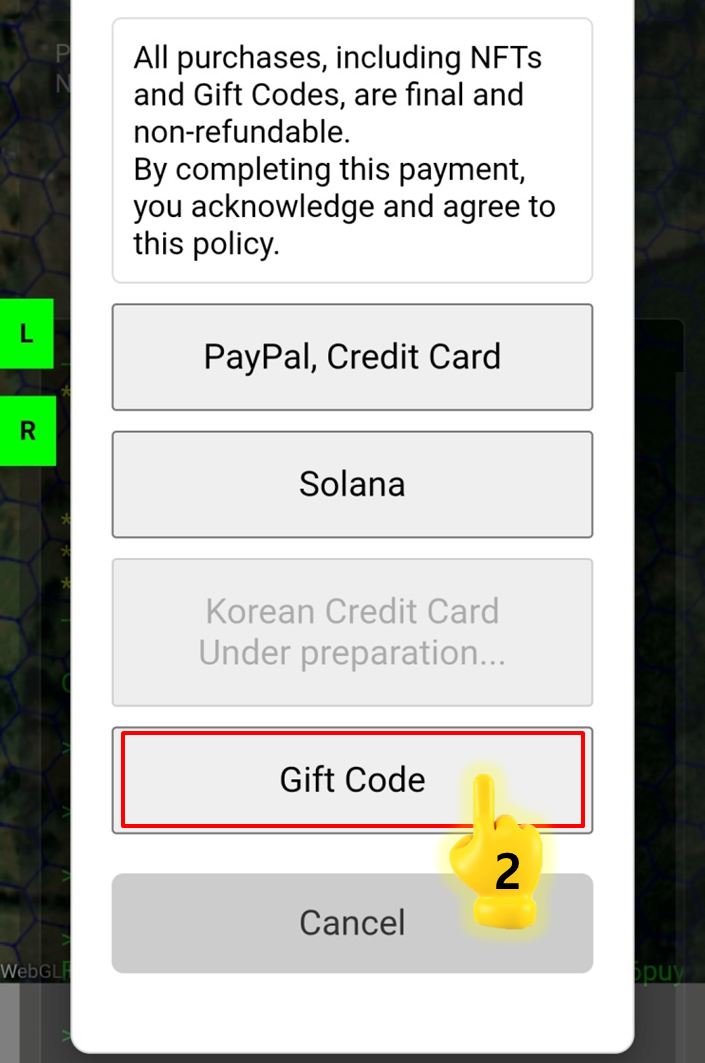
<figure><img src="https://2902267430-files.gitbook.io/~/files/v0/b/gitbook-x-prod.appspot.com/o/spaces%2F5LAEHDS7jvCC6hgJFI2D%2Fuploads%2FpTniuScyqndXuclldPCV%2Fimage.png?alt=media&amp;token=5ad7339e-78c6-44fb-89ec-72d01ffc7460" alt="" width="353"><figcaption></figcaption></figure>

2. Tap \[Gift Code]

<figure><img src="https://2902267430-files.gitbook.io/~/files/v0/b/gitbook-x-prod.appspot.com/o/spaces%2F5LAEHDS7jvCC6hgJFI2D%2Fuploads%2FXrq2vTyVqrKphRmqHJWw%2Fimage.png?alt=media&amp;token=96018f98-8d1b-4fcb-8ced-d57e1958f01e" alt="" width="375"><figcaption></figcaption></figure>

{% hint style="success" %}

### A Gift Code contains 3 important pieces of info.

1. The number of Tiles included in the Gift Code
2. The Gift Code serial number
3. The Gift Code is valid for 1 month.
   {% endhint %}

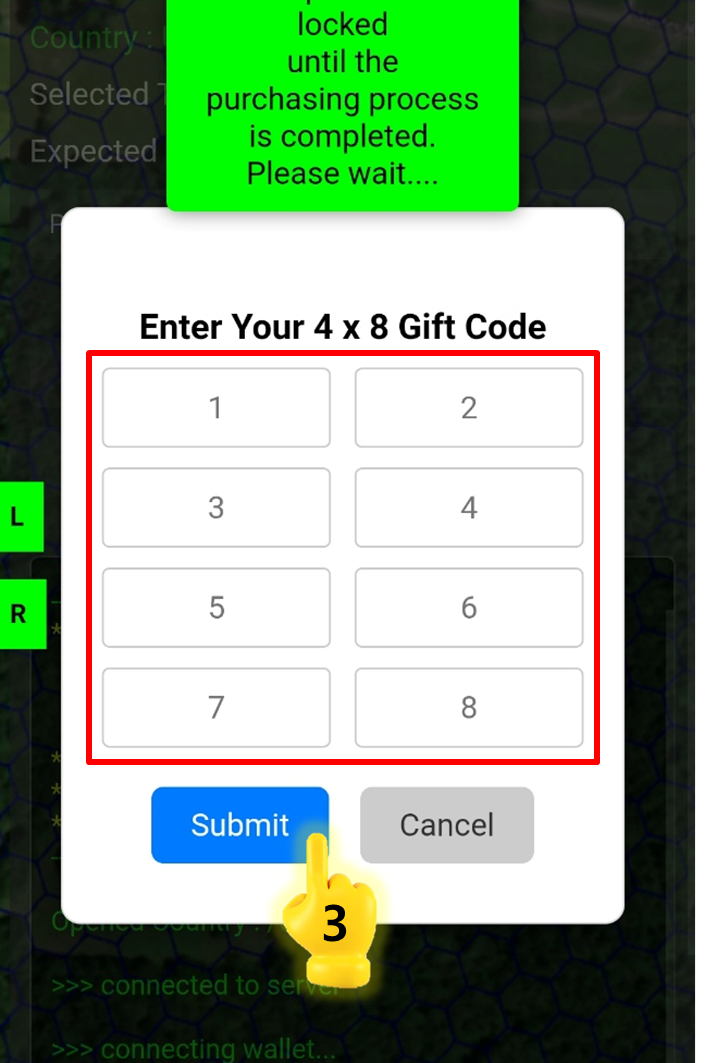
<figure><img src="https://2902267430-files.gitbook.io/~/files/v0/b/gitbook-x-prod.appspot.com/o/spaces%2F5LAEHDS7jvCC6hgJFI2D%2Fuploads%2F1d72wvTytQVKxXPaWaaN%2Fimage.png?alt=media&amp;token=35d8f80e-bc1d-424a-a10e-ee3149d94547" alt="" width="353"><figcaption></figcaption></figure>

3. Enter Gift Code number & Click \[Submit] → Done.

{% hint style="warning" %}

### NOTE

If the number of selected Tiles does not match the number of Tiles specified in the Gift Code, a WARNING message will appear and the purchase will not proceed.
{% endhint %}
{% endstep %}

{% step %}

#### <mark style="color:$primary;">Confirm</mark> your Purchase

<figure><img src="https://2902267430-files.gitbook.io/~/files/v0/b/gitbook-x-prod.appspot.com/o/spaces%2F5LAEHDS7jvCC6hgJFI2D%2Fuploads%2Fdmwe5fYqh0fdo1uaO8yv%2Fimage.png?alt=media&amp;token=895a2923-b5fb-4335-bf34-89cb134498e6" alt="" width="563"><figcaption></figcaption></figure>

1. Tile & Grid color updates and Marker creation

<figure><img src="https://2902267430-files.gitbook.io/~/files/v0/b/gitbook-x-prod.appspot.com/o/spaces%2F5LAEHDS7jvCC6hgJFI2D%2Fuploads%2FRkzV1i3z9xFqMnu8M9eo%2Fimage.png?alt=media&amp;token=697c8ef4-ef05-48ad-ac28-6bdc38046df9" alt="" width="353"><figcaption></figcaption></figure>

2. Transaction details available in the Info screen

<figure><img src="https://2902267430-files.gitbook.io/~/files/v0/b/gitbook-x-prod.appspot.com/o/spaces%2F5LAEHDS7jvCC6hgJFI2D%2Fuploads%2FuJ34xm59yey5oKGOzeA9%2Fimage.png?alt=media&amp;token=601756ef-3ba8-4529-890b-abac402b0a51" alt="" width="563"><figcaption></figcaption></figure>

3. NFT creation (viewable in your personal Wallet)
   {% endstep %}
   {% endstepper %}
   {% endtab %}
   {% endtabs %}
### **PayPal**

You can use PayPal or supported credit/debit cards to complete your purchase.

{% hint style="warning" %}
South Korean-issued Debit/Credit Cards cannot be used when purchasing through PayPal.
{% endhint %}

{% tabs %}
{% tab title="PC" %}
{% stepper %}
{% step %}

#### <mark style="color:$primary;">Search</mark> / <mark style="color:$primary;">Select</mark> Tiles & <mark style="color:$primary;">Connect</mark> Wallet

1. [How do I find the Tile I want?](/guidebook/markdown/how-do-i-find-the-tile-i-want.md)
2. [How do I Select Tiles?](/guidebook/markdown/how-do-i-select-tiles.md)
3. [How do I connect my wallet?](/guidebook/markdown/how-do-i-connect-my-wallet.md)
   {% endstep %}

{% step %}

#### <mark style="color:$primary;">Check</mark> the Price

<figure><img src="https://2902267430-files.gitbook.io/~/files/v0/b/gitbook-x-prod.appspot.com/o/spaces%2F5LAEHDS7jvCC6hgJFI2D%2Fuploads%2Fr6FJWW5Awtzz9C02XmZk%2Fimage.png?alt=media&amp;token=40c51b5e-0b39-4eb9-ac95-f4d8c36f1756" alt="" width="563"><figcaption></figcaption></figure>

When you open <mark style="color:$success;">R panel</mark>, the total price will be displayed based on the number of selected Tiles.

* Tile price: $5 /tile ($5.5 including VAT 10%)
* NFT minting cost (including transaction fees) is approximately 0.03 SOL
  {% endstep %}

{% step %}

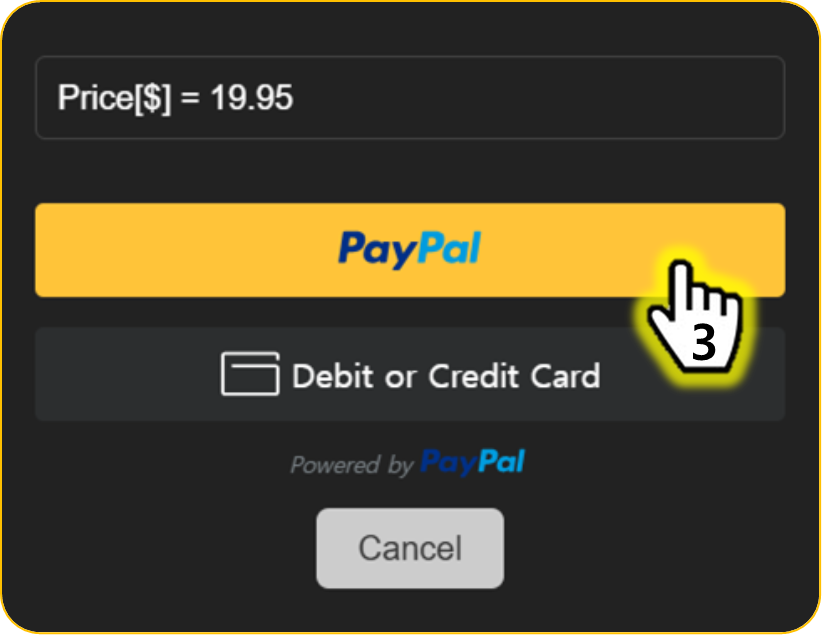
#### <mark style="color:$primary;">Pay</mark> with \[PayPal]

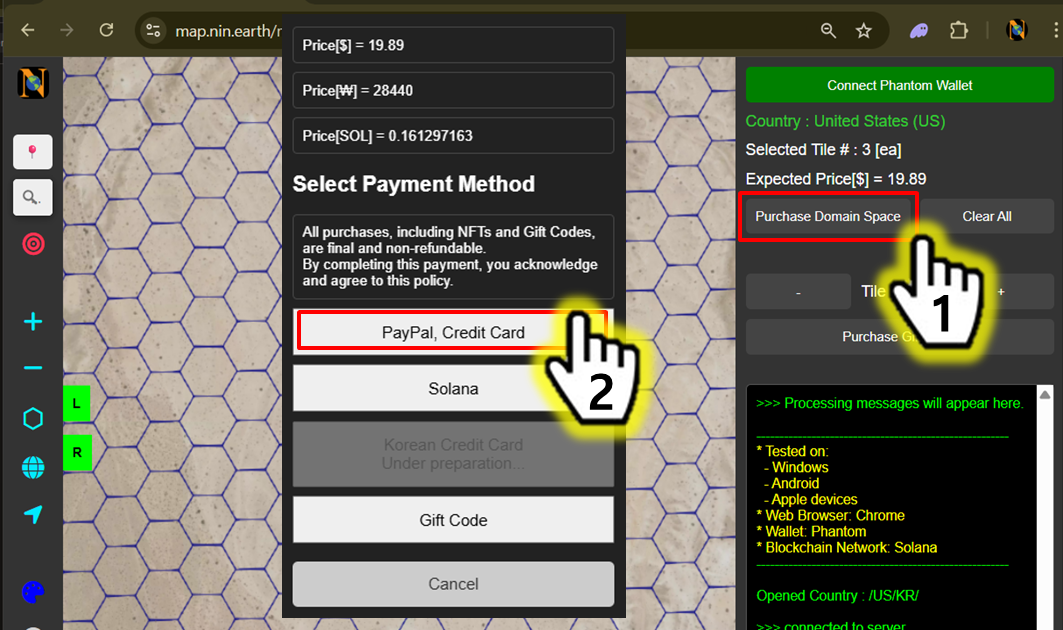
<figure><img src="https://2902267430-files.gitbook.io/~/files/v0/b/gitbook-x-prod.appspot.com/o/spaces%2F5LAEHDS7jvCC6hgJFI2D%2Fuploads%2FByDY79pi8orswRsQFWU4%2Fimage.png?alt=media&amp;token=4f7af1e3-cba1-4fcf-982b-d300a293ed7f" alt="" width="563"><figcaption></figcaption></figure>

1. Click \[Purchase Domain Space]
2. Click \[PayPal]

<figure><img src="https://2902267430-files.gitbook.io/~/files/v0/b/gitbook-x-prod.appspot.com/o/spaces%2F5LAEHDS7jvCC6hgJFI2D%2Fuploads%2FU5bFMKxGx651RfeSPXq2%2Fimage.png?alt=media&amp;token=242b3ce4-f82e-4f76-a4cd-90a1c6d15521" alt="" width="563"><figcaption></figcaption></figure>

3. Click \[Paypal] or \[Debit/Credit Card] → Done.

{% hint style="success" %}

### NOTE.

PayPal & Card payment services are not currently available in \[KR] South Korea.
{% endhint %}
{% endstep %}

{% step %}

#### <mark style="color:$primary;">Confirm</mark> your Purchase

<figure><img src="https://2902267430-files.gitbook.io/~/files/v0/b/gitbook-x-prod.appspot.com/o/spaces%2F5LAEHDS7jvCC6hgJFI2D%2Fuploads%2Fdmwe5fYqh0fdo1uaO8yv%2Fimage.png?alt=media&amp;token=895a2923-b5fb-4335-bf34-89cb134498e6" alt="" width="563"><figcaption></figcaption></figure>

1. Tile & Grid color updates and Marker creation

<figure><img src="https://2902267430-files.gitbook.io/~/files/v0/b/gitbook-x-prod.appspot.com/o/spaces%2F5LAEHDS7jvCC6hgJFI2D%2Fuploads%2FROY4Alx51RfKjYUp4LPt%2Fimage.png?alt=media&amp;token=759bc49c-a8a8-4934-9a3f-b201cdd9c122" alt="" width="563"><figcaption></figcaption></figure>

2. Transaction details available in the Info screen

<figure><img src="https://2902267430-files.gitbook.io/~/files/v0/b/gitbook-x-prod.appspot.com/o/spaces%2F5LAEHDS7jvCC6hgJFI2D%2Fuploads%2FuJ34xm59yey5oKGOzeA9%2Fimage.png?alt=media&amp;token=601756ef-3ba8-4529-890b-abac402b0a51" alt="" width="563"><figcaption></figcaption></figure>

3. NFT creation (viewable in your personal Wallet)
   {% endstep %}
   {% endstepper %}
   {% endtab %}

{% tab title="Mobile" %}
{% stepper %}
{% step %}

#### <mark style="color:$primary;">Search</mark> / <mark style="color:$primary;">Select</mark> Tiles & <mark style="color:$primary;">Connect</mark> Wallet

1. [How do I find the Tile I want?](/guidebook/markdown/how-do-i-find-the-tile-i-want.md)
2. [How do I Select Tiles?](/guidebook/markdown/how-do-i-select-tiles.md)
3. [How do I connect my wallet?](/guidebook/markdown/how-do-i-connect-my-wallet.md)
   {% endstep %}

{% step %}

#### <mark style="color:$primary;">Check</mark> the Price

<figure><img src="https://2902267430-files.gitbook.io/~/files/v0/b/gitbook-x-prod.appspot.com/o/spaces%2F5LAEHDS7jvCC6hgJFI2D%2Fuploads%2F1QW2km7SFNzVJ5S89PcI%2Fimage.png?alt=media&amp;token=dac2725b-79cb-4839-a03d-f25792bf8209" alt="" width="354"><figcaption></figcaption></figure>

When you tap <mark style="color:$success;">R panel</mark>, the total price will be displayed based on the number of selected Tiles.

* Tile price: $5 /tile ($5.5 including VAT 10%)
* NFT minting cost (including transaction fees) is approximately 0.03 SOL
  {% endstep %}

{% step %}

#### <mark style="color:$primary;">Pay</mark> with \[Solana]

<figure><img src="https://2902267430-files.gitbook.io/~/files/v0/b/gitbook-x-prod.appspot.com/o/spaces%2F5LAEHDS7jvCC6hgJFI2D%2Fuploads%2FqBmQnWLjQ7mY8NU5nirX%2Fimage.png?alt=media&amp;token=ddd55bfd-5299-4aa0-8291-1f4769274e46" alt="" width="353"><figcaption></figcaption></figure>

1. Tap \[Purchase Domain Space]

<figure><img src="https://2902267430-files.gitbook.io/~/files/v0/b/gitbook-x-prod.appspot.com/o/spaces%2F5LAEHDS7jvCC6hgJFI2D%2Fuploads%2Fw0SfTMfCOuJrx59LT7L5%2Fimage.png?alt=media&amp;token=09836287-9cad-4059-8e6b-86d571f6abb3" alt="" width="353"><figcaption></figcaption></figure>

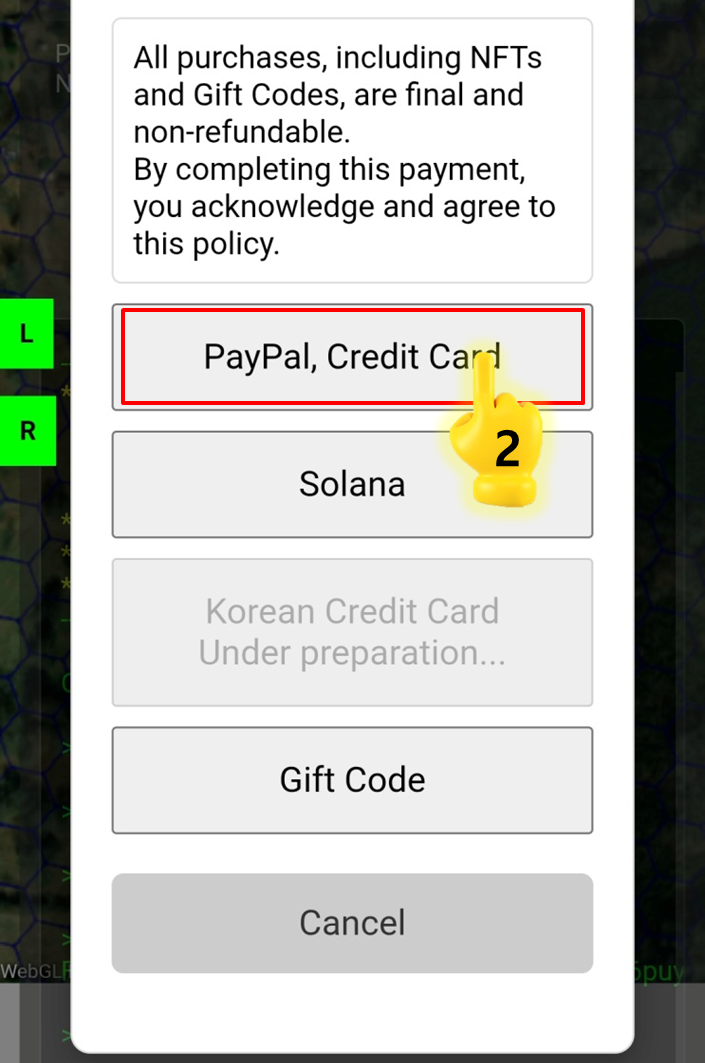
2. Tap \[PayPal]

<figure><img src="https://2902267430-files.gitbook.io/~/files/v0/b/gitbook-x-prod.appspot.com/o/spaces%2F5LAEHDS7jvCC6hgJFI2D%2Fuploads%2FnIDZfJr5rmrb1wWwnrF7%2Fimage.png?alt=media&amp;token=5638a362-867f-43bb-8526-629d87162cbf" alt="" width="353"><figcaption></figcaption></figure>

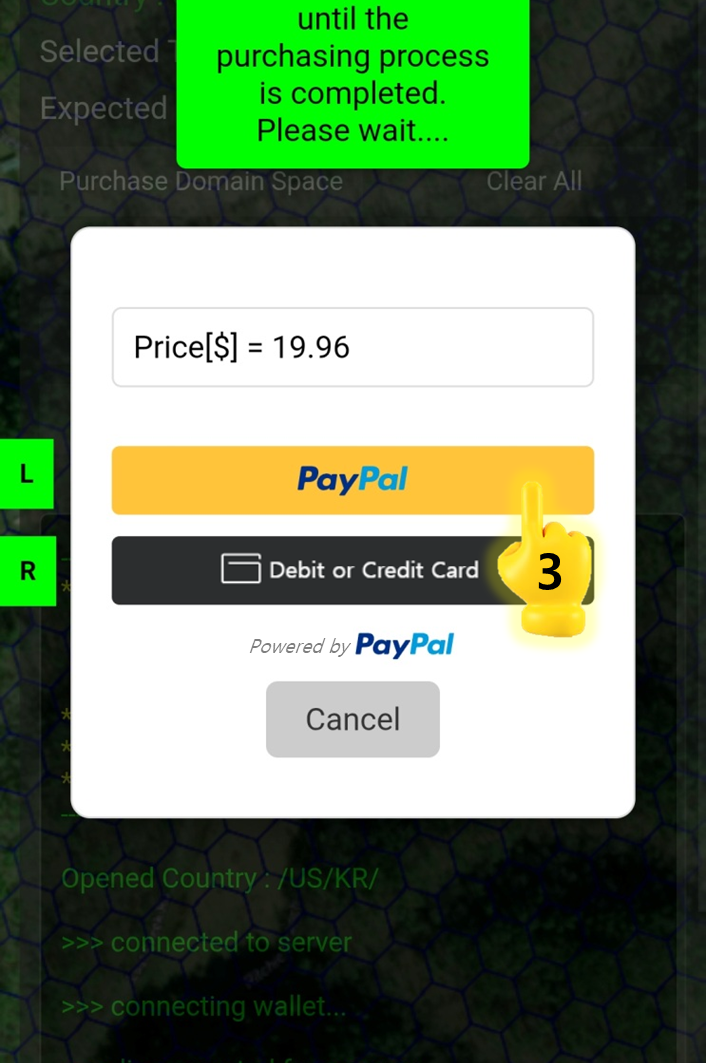
3. Tap \[Paypal] or \[Debit/Credit Card] → Done.

{% hint style="warning" %}

### NOTE

PayPal & Card payment services are not currently available in \[KR] South Korea.
{% endhint %}
{% endstep %}

{% step %}

#### <mark style="color:$primary;">Confirm</mark> your Purchase

<figure><img src="https://2902267430-files.gitbook.io/~/files/v0/b/gitbook-x-prod.appspot.com/o/spaces%2F5LAEHDS7jvCC6hgJFI2D%2Fuploads%2Fdmwe5fYqh0fdo1uaO8yv%2Fimage.png?alt=media&amp;token=895a2923-b5fb-4335-bf34-89cb134498e6" alt="" width="563"><figcaption></figcaption></figure>

1. Tile & Grid color updates and Marker creation

<figure><img src="https://2902267430-files.gitbook.io/~/files/v0/b/gitbook-x-prod.appspot.com/o/spaces%2F5LAEHDS7jvCC6hgJFI2D%2Fuploads%2FRkzV1i3z9xFqMnu8M9eo%2Fimage.png?alt=media&amp;token=697c8ef4-ef05-48ad-ac28-6bdc38046df9" alt="" width="353"><figcaption></figcaption></figure>

2. Transaction details available in the Info screen

<figure><img src="https://2902267430-files.gitbook.io/~/files/v0/b/gitbook-x-prod.appspot.com/o/spaces%2F5LAEHDS7jvCC6hgJFI2D%2Fuploads%2FuJ34xm59yey5oKGOzeA9%2Fimage.png?alt=media&amp;token=601756ef-3ba8-4529-890b-abac402b0a51" alt="" width="563"><figcaption></figcaption></figure>

3. NFT creation (viewable in your personal Wallet)
   {% endstep %}
   {% endstepper %}
   {% endtab %}
   {% endtabs %}